An email alias is an alternate email address that sends messages to an existing inbox. Businesses often use aliases such as info@, sales@, support@, billing@, or newsletter@ to keep communication organized without creating a separate mailbox for each address.
For email marketing, aliases can be useful for sender identity, reply management, customer questions, campaign follow-up, and department routing. The address a customer sees in their inbox should be clear, recognizable, and connected to a real communication process.
FireDrum Email Marketing helps businesses manage campaigns, contacts, automation, reporting, and email strategy. Understanding how aliases work can help companies send more organized campaigns and handle replies more effectively.
What Is an Email Alias?
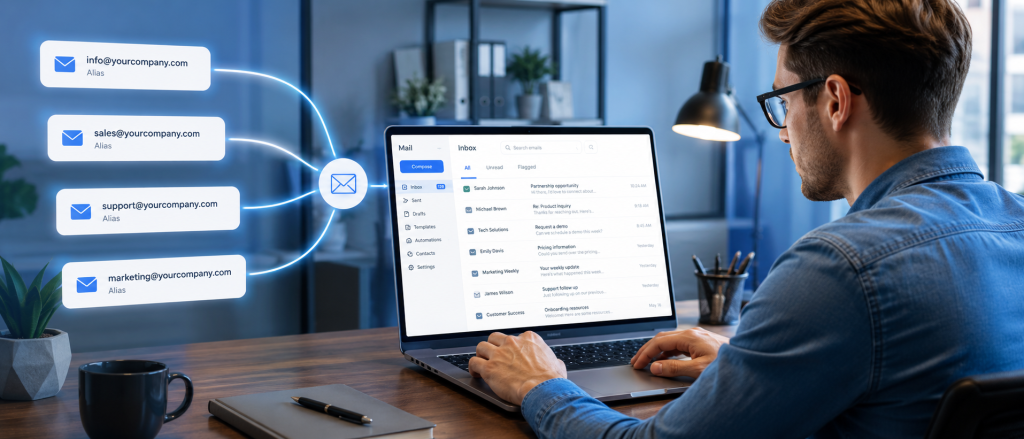
An email alias is an additional email address connected to an existing mailbox. Messages sent to the alias are delivered to the main inbox, allowing a business to share multiple addresses without creating a new email account for each.
For example:
- Main inbox: jane@company.com
- Alias: marketing@company.com
Emails sent to marketing@company.com may end up in Jane’s regular inbox. In most cases, the alias does not have its own password, separate inbox, or independent mailbox unless the email provider configures it that way.
Email Alias vs. Email Account
An email account has its own inbox, login, storage, settings, and password. It works as a full mailbox that someone can access directly.
An email alias is different. It is an alternative address associated with an existing email account or mailbox.
A practical comparison:
- The email account support@company.com has its own mailbox and login.
- Email alias: events@company.com forwards to an employee’s existing inbox.
A business should use a full email account when a person, department, or team needs separate login access, separate storage, and its own inbox. An alias works better when messages can go to an existing person or team inbox.
Email Alias vs. Forwarding Address
Aliases and forwarding are often connected, but they are not always the same setup. An alias usually belongs to the same email system and domain. Forwarding can send messages from one mailbox or address to another mailbox.
For example:
- Alias: sales@company.com delivers to tom@company.com inside the same email system.
- Forwarding: oldsales@company.com sends messages to a new address after a staff change.
This matters because different email providers handle aliases, forwarding, replies, sending permissions, and authentication differently. Before using an alias for customer communication or email marketing, businesses should understand how that address receives mail, whether it can send mail, who monitors it, and whether it is properly configured for the company’s domain.
Why Businesses Use Email Aliases

To Create Professional Department Addresses
Email aliases help businesses publish role-based email addresses without tying every public contact point to a single employee’s name. This makes communication look more professional and gives customers a clear way to reach the right department.
Common alias examples include:
- info@
- sales@
- support@
- billing@
- marketing@
- events@
- newsletter@
- reservations@
- service@
These addresses are easy for customers to understand. A person with a billing question can write to billing@, while a prospect can contact sales@. The business can also change who receives those emails without changing the public address on the website, email signature, forms, printed materials, or marketing campaigns.
To Protect Personal Employee Email Addresses
Sharing a general alias can reduce the frequency with which employees need to publish their direct email addresses. This can help reduce inbox clutter, protect employee contact information, and make staffing changes easier.
For example, a company may list support@company.com on the website instead of a specific employee’s address. If the support manager changes, the alias can be redirected to someone else without updating the website, email footer, forms, or printed material.
To Make Replies Easier to Manage
Marketing emails, newsletters, promotions, and automated campaigns can generate replies. Subscribers may ask questions, request quotes, comment on an offer, need support, or become confused about how to unsubscribe. A dedicated alias can route those replies to the right person or team.
Email marketing examples include:
- newsletter@company.com for general campaign replies
- offers@company.com for promotions
- events@company.com for webinar or event communication
- support@company.com for customer help
To Support Different Brands, Locations, or Campaigns
Companies with multiple divisions, franchise locations, sales teams, or campaigns may use aliases to keep communication organized. This can help teams separate inquiries by location, audience, campaign type, or customer need.
Examples include:
- phoenix@company.com for local inquiries
- wholesale@company.com for vendor communication
- loyalty@company.com for customer rewards
- vip@company.com for high-value customer programs
Aliases should stay simple and easy to recognize. Creating too many aliases without a clear management plan can create confusion, missed replies, and outdated routing. Each alias should have a clear purpose, a responsible owner, and a process for checking and responding to messages.
How Email Aliases Work in Day-to-Day Business Communication
Receiving Messages Through an Alias
When someone sends a message to an email alias, that message is delivered to the connected inbox or group of recipients. The person sending the message does not need to know whether the address is a full mailbox, an alias, or a routed address. They only see the public-facing email address.
Each alias should have a clear owner. Someone should know who receives the messages, who is responsible for responding, and how often the inbox is checked. Businesses should also review alias routing after staffing changes so messages do not keep going to the wrong person.
Sending From an Alias
Some email platforms allow users to send messages from an alias. This depends on the email provider, account permissions, and sending settings.
For example, Jane may receive email at jane@company.com but send replies from marketing@company.com. This can help the reply look more consistent with the department or campaign, especially when the message is meant to come from the business rather than one individual.
Before using an alias to send customer-facing messages, businesses should:
- Check whether the alias is authorized for sending.
- Confirm the sender’s name looks professional.
- Test replies before using the alias with customers.
- Make sure the signature matches the sender’s address.
- Confirm the reply goes to the right inbox.
For email marketing, sending from an alias should be handled carefully. The sender address, domain authentication, and reply handling can affect trust and deliverability. A professional-looking alias is helpful only if it is properly configured and actively monitored.
Email Aliases and Email Marketing
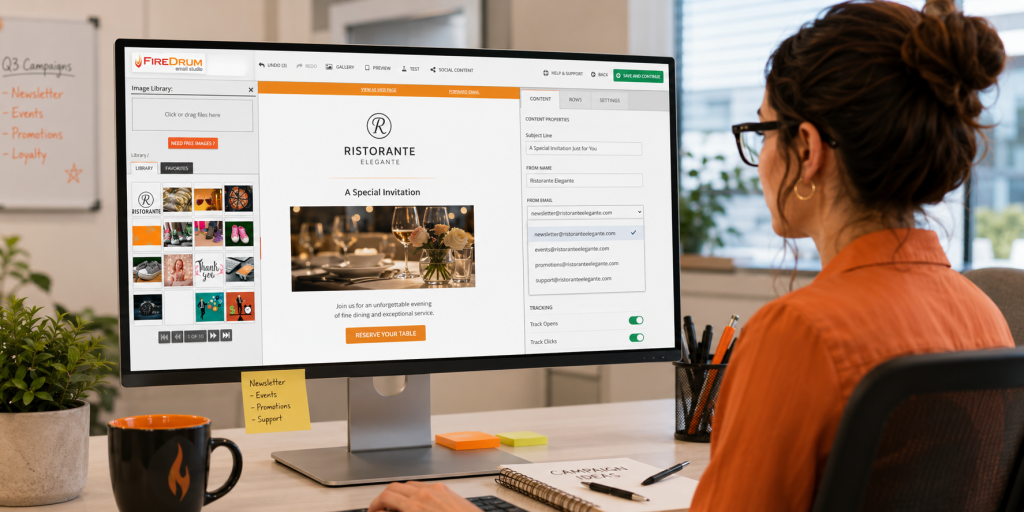
Choosing a Sender Address for Campaigns
The sender address affects how subscribers recognize an email. A clear sender address can improve trust, reduce confusion, and help contacts understand why they are receiving the message.
Common sender address options include:
- newsletter@company.com
- marketing@company.com
- offers@company.com
- events@company.com
- support@company.com
- A real person’s address for relationship-based campaigns
The best choice depends on the campaign. A company newsletter may work well from the newsletter@ address, while a personal sales follow-up may perform better from a real person’s address. The address should be recognizable, professional, and connected to the message being sent.
Avoid strange, vague, or overly generic addresses that could make subscribers question the email. Keep the sender name consistent with the brand, and make sure replies are monitored before the campaign goes out.
Using Aliases for Reply Management
Email marketing is not only about sending messages. Replies can contain sales leads, service requests, feedback, questions, and unsubscribe requests. A monitored alias helps route those replies to the right person or department.
For example, a retail promotion may use offers@ so customer questions go to the marketing or sales team. A nonprofit newsletter may use outreach@, so donor replies reach the right staff member. A B2B campaign may use a salesperson’s address when direct relationship building matters.
The reply address should match the campaign purpose. Avoid using an address nobody checks. Create a clear process for forwarding replies to sales, support, account managers, or customer service when needed.
No-Reply Addresses and Why They Can Be Frustrating
Some businesses use no-reply addresses because they do not want to manage responses. This can make customers feel blocked when they have a question, comment, order issue, account concern, or buying interest.
A monitored alias is often a better option. It gives customers a clear way to respond and gives the business a chance to capture sales opportunities, address service issues, and gather customer feedback.
FireDrum’s email marketing services focus on helping businesses communicate with contacts, support engagement, and improve campaign performance. That means the reply strategy should be part of campaign planning, not an afterthought.
Email Aliases, Deliverability, and Authentication
Why the Domain Matters
A business email alias usually uses the company’s domain. This helps the sender’s address look professional and consistent with the business website, brand, and customer communication.
For example:
- Better brand fit: newsletter@company.com
- Less professional for a business campaign: companynewsletter@gmail.com
A branded sender address can make an email feel more trustworthy to subscribers. It also helps customers recognize who the message is from before they open it.
Businesses should use a domain that matches the company website, keep sender addresses recognizable, and avoid switching sender addresses too often. Consistency helps subscribers know what to expect when emails arrive in their inbox.
How Authentication Affects Sending
Before using an alias for email marketing, businesses should make sure the sending domain is properly authenticated. An alias may be able to receive mail, but that does not automatically mean it is ready to send marketing campaigns.
Email authentication can involve SPF, DKIM, and DMARC records.
In practical terms:
- SPF helps identify which services are allowed to send email for the domain.
- DKIM adds a digital signature that helps verify the message.
- DMARC gives receiving servers instructions for handling messages that fail authentication checks.
These records help email providers evaluate whether a message is coming from an approved source. Proper setup can support sender trust and reduce confusion when a business sends campaigns through an email marketing platform.
FireDrum’s knowledge base covers deliverability and authentication, so businesses using FireDrum should follow the setup guidance or ask support for help. Before sending marketing emails from a new alias or sender address, confirm that the domain is authenticated and the reply process works correctly.
Alias Setup Does Not Replace List Quality
A clean, professional alias can help with branding and reply management, but it does not replace strong list quality. Campaign performance still depends on who is receiving the emails, how those contacts were collected, and how well the list is maintained.
List management considerations include:
- Permission-based contacts
- Accurate imports
- Segmentation
- Bounce management
- Unsubscribe compliance
- Updated contact records
A business can have a well-branded sender address and still struggle if the list contains old, unengaged, incorrect, or unapproved contacts. Sender setup and list quality need to work together.
FireDrum supports contact management, segmentation, automation, analytics, and managed services, helping businesses manage email marketing beyond sender address setup. An alias is part of the larger campaign process, alongside list hygiene, content, timing, reporting, and follow-up.
How FireDrum Email Marketing Can Help Businesses With Email Communication

Email Campaign Setup and Strategy
FireDrum helps businesses create, send, automate, and manage email marketing campaigns. The platform supports templates, contact management, reporting, automation, and campaign tools that help companies communicate with customers and prospects more consistently.
Email aliases can be part of that planning process. Before a campaign is sent, businesses should decide which sender address will appear in the inbox, where replies should go, and who is responsible for follow-up.
A clear alias strategy can support better customer communication after emails are sent. For example, a newsletter may use newsletter@company.com, while a promotion may use offers@company.com so customer questions reach the right team.
Managed Email Marketing Support
Some businesses need more than software access. They may need help with campaign planning, copy, design, testing, scheduling, optimization, and strategy.
Managed email marketing support can help businesses think through campaign sender names, reply addresses, and response handling. This matters because email campaigns often create follow-up opportunities. A customer may reply with a question, a quote request, a service concern, or interest in buying.
Deliverability and Authentication Guidance
Sender setup should include domain authentication and deliverability planning. Before using a new domain, alias, or sender address for email marketing, businesses should ask questions and confirm the setup is correct.
FireDrum provides resources around deliverability, authentication, and email marketing best practices. This can help businesses understand how sender addresses, SPF, DKIM, DMARC, list quality, and reply handling fit into a stronger email marketing program.
Proper setup can help protect the brand, reduce confusion for subscribers, and support better campaign performance.
Email Aliases Make Business Email Easier to Manage
An email alias is a simple tool that can make business communication more organized. It gives companies flexible addresses for departments, campaigns, locations, and customer replies without requiring a separate mailbox for every address.
To use aliases effectively, businesses should define the purpose of each alias, assign an owner, confirm routing, test sending and receiving, authenticate campaign-sending domains, and review aliases before major email marketing campaigns.
A good alias strategy helps businesses manage replies, maintain brand consistency, and support better customer communication. When customers respond to a campaign, ask a question, or request help, the message should reach the right person or team.
FireDrum Email Marketing can help businesses connect sender strategy, campaign management, automation, deliverability, reporting, and managed email marketing support. With the right setup, aliases can become part of a cleaner, more effective email marketing process.
Contact FireDrum Email Marketing to get help setting up, managing, and improving your email marketing campaigns.
FAQs
Can I send an email from an alias?
Some email providers allow users to send from an alias, but it depends on the platform and settings. Businesses should test sending, sender names, signatures, replies, and authentication before using an alias for customer communication.
Should I use an email alias for email marketing?
An email alias can be useful for campaign replies, department communication, and sender consistency. The alias should be monitored, easy to recognize, and properly connected to the company’s email marketing setup.
What are common examples of email aliases?
Common examples include info@, sales@, support@, billing@, marketing@, newsletter@, events@, and service@. The best aliases match how customers contact the business.
Are no-reply email addresses a good idea?
No-reply addresses can frustrate customers who want to ask questions or respond to a campaign. A monitored alias is often better because it keeps communication open.
Do email aliases affect deliverability?
An alias alone does not solve deliverability. Businesses should use proper domain authentication, clean contact lists, strong permission practices, and clear sender information